
アプリのご登録方法
App registration is limited to construction workers assigned to construction sites where “ビルダーズポイント” has already been implemented.
You must register for the app to receive points.
This translation is provided by machine translation. In the event of any discrepancies, inconsistencies, or contradictions between the provided translation and the Japanese version, the Japanese version shall take precedence.
What are ビルダーズポイント(Builders Point)?
Earn and use points on construction sites!
Prime contractors will award points to construction workers who have contributed to construction sites as a token of appreciation!
Accumulated points can be exchanged for e-money or gifts!
How to Register for the App
Step 1Install the App
Install the app from the iPhone/Google Play banner
- iPhone

- Android
Step 2Register as a New User
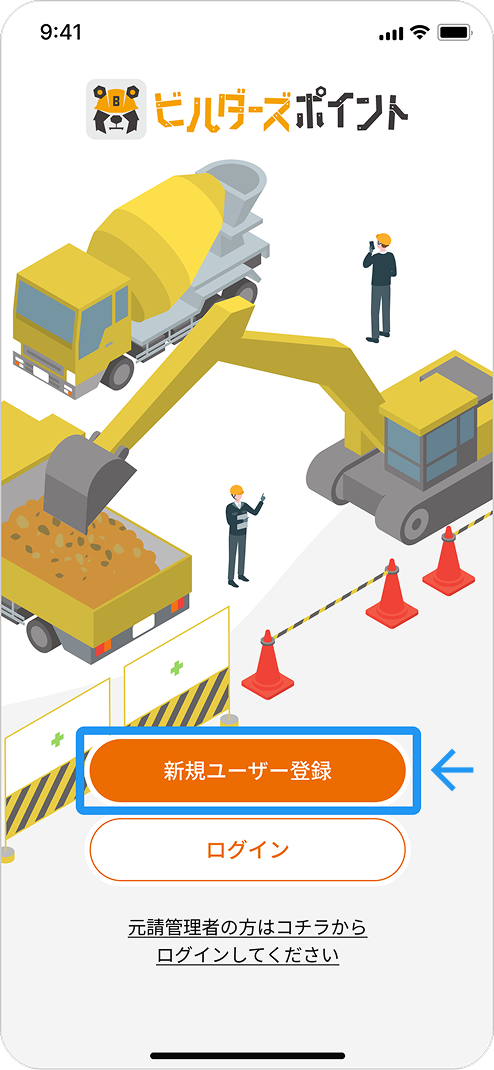
Launch the “ビルダーズポイント” app and tap the “新規ユーザー登録” button
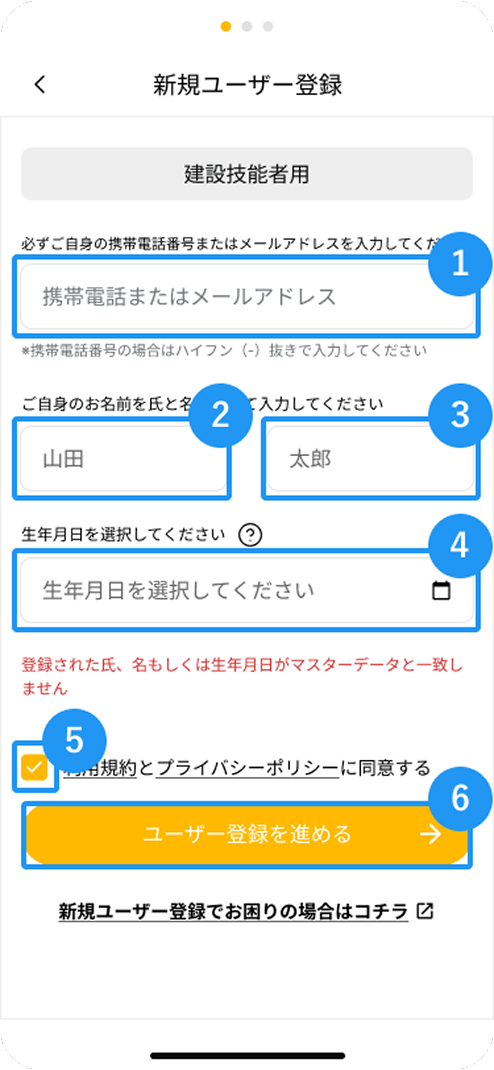
Step 3Enter User Information
- Enter your phone number or email address
- Enter your last name
- Enter your first name
- Enter your date of birth
- Check the box next to ”利用規約とプライバシーポリシーに同意する”
- Tap “ユーザー登録を進める”
Step 4Confirmation Regarding Tax Filing Obligations
Review the “税の申告義務について” information displayed on the screen, then tap “ユーザー認証へ進める”
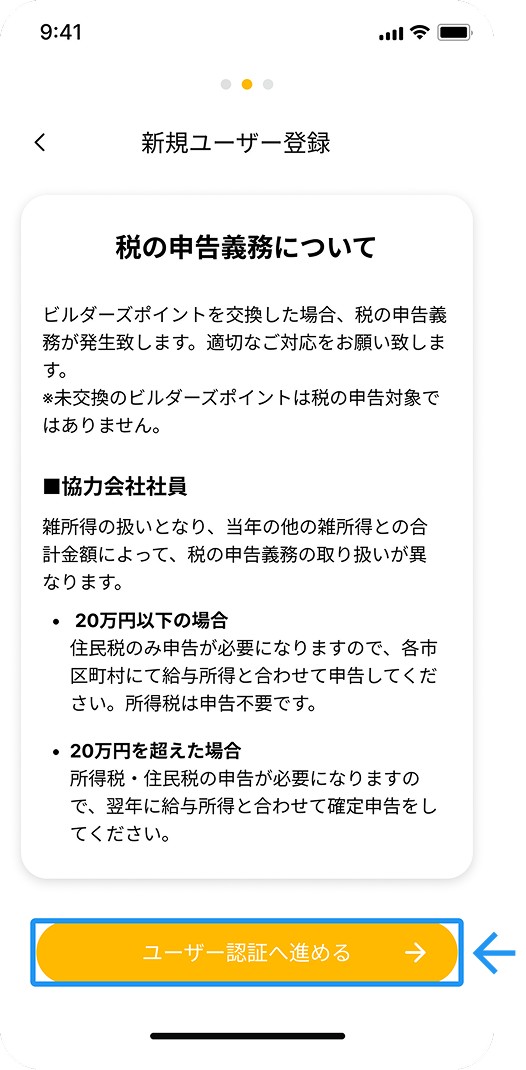
If you exchange points for e-money or gifts, you may be required to file a tax return. Please check the link for details.
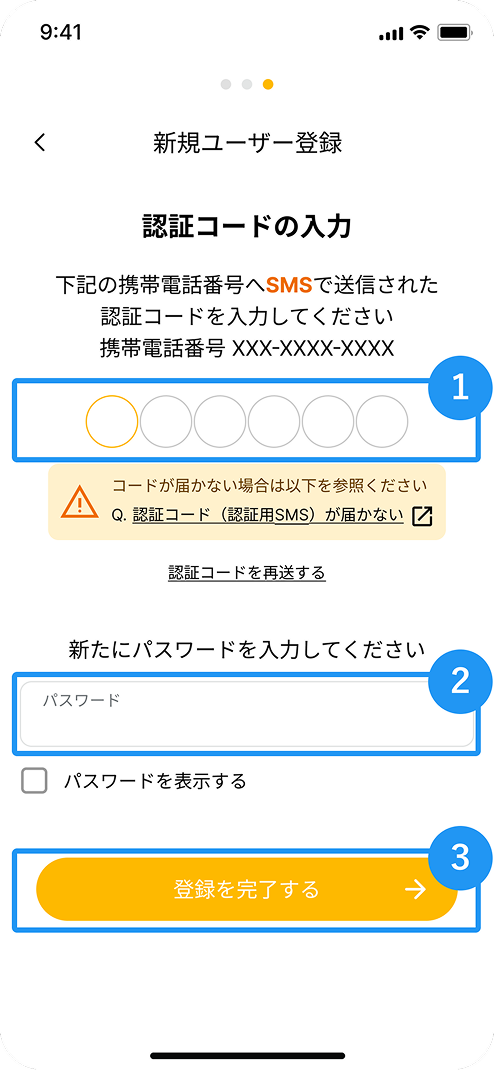
Step 5Enter Authentication Code
- Enter the authentication code sent to the phone number or email address you entered in Step 3
- Enter a password of your choice
- Tap “登録を完了する”
FAQ
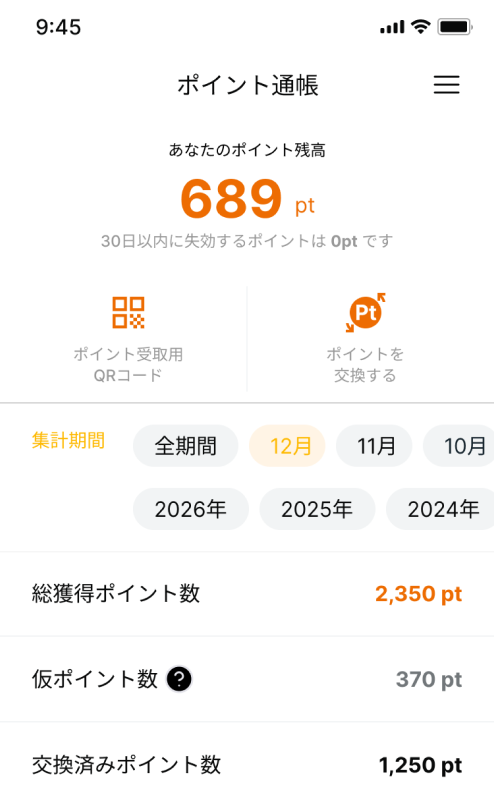
Step 6User Registration Complete
Great job!
Your app registration is complete.
You can check your point balance and redeem points from the “ポイント通帳” screen.
FAQ
Q.My app isn't showing up on the App Store or Google Play (I can't find it when I search for it)
A.Depending on your device or app store settings, the “ビルダーズポイント” app may not appear. It is not compatible with iPads and therefore will not appear on them. Even on smartphones, the app may not appear or install if your App Store or Google Play country/region settings are set to a location other than Japan. *Please note that changes to your country/region settings may not be immediately reversible.
Q.I cannot register because the message “登録された氏名、もしくは生年月日がマスタデータと一致しません” appears.
A.Please contact your general contractor. To register as a member of ビルダーズポイント, the information you enter must match the details of the construction professionals already registered by your general contractor, so there is a possibility that the registration information is incorrect.
Q.I did not receive the verification code (verification SMS) when registering with my phone number.
A. If you do not receive the verification code (verification SMS) on the device associated with the phone number, please try the following:
- Verify the phone number you entered. If you entered a phone number other than the one on the device you are using, you will not receive the verification code (verification SMS).
- Check the “Unknown Sender” folder. If you have enabled filtering settings for unregistered contacts, you will not receive notifications for messages from senders not in your contacts.
- Disable SMS blocking. Disabling SMS blocking may allow you to receive the code. Please try disabling any SMS blocking settings configured by your carrier or apps.
Q.I did not receive the verification code (verification email) when registering with an email address
A.When you register a new account using an email address, the verification code is sent to the email address you entered. If you do not receive the verification code, please try the following steps:
- Check your email address: Please verify that the registered email address is correct. If it is incorrect, please change it to the correct email address.
- Check your spam folder: Please check to see if the verification code has been filtered into your spam folder.
- Check your spam filter settings: Please check to see if the spam filter settings on your smartphone or email app are enabled.
If the issue persists after trying these steps, please contact us here.
(For Construction workers Only)
Support is available in Japanese only.
- iPhone
- Android
